
Download RoboForm – Secure Password Manager & Form‑Filling Tool
Overview
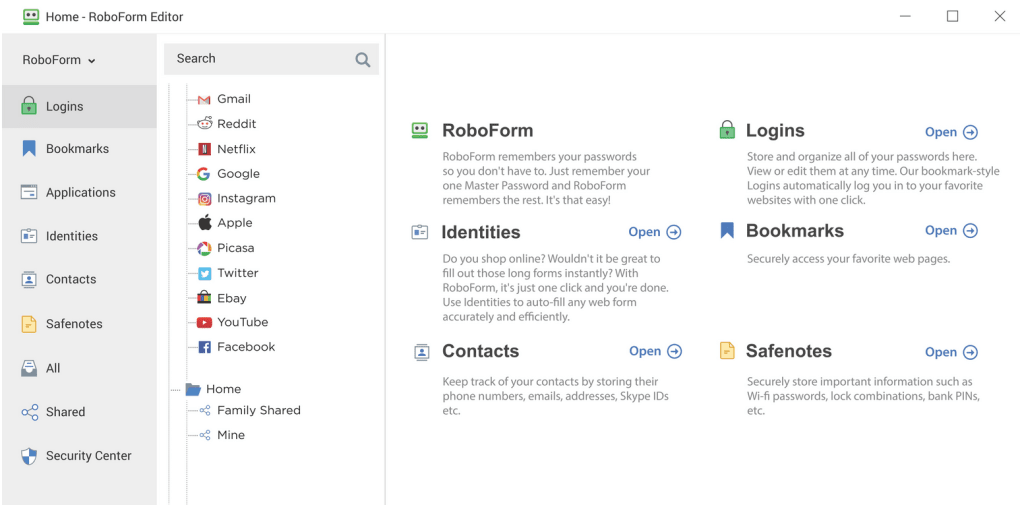
RoboForm is a veteran password‑manager that focuses on making online form‑filling fast, secure, and virtually error‑free. By storing every password, credit‑card number, address, and other sensitive data behind a single master password, RoboForm eliminates the need to remember dozens of credentials while keeping your personal information encrypted with industry‑standard algorithms. The moment you launch the application, a discreet icon appears in the system tray, ready to capture login details, generate strong passwords, and auto‑populate web forms with a single click.
One of the most appreciated security layers is the automatic log‑off feature, which can lock the vault after a configurable idle period or when you lock your workstation, reducing the risk of unauthorized access. In addition to classic password storage, RoboForm supports “identities” that bundle together name, phone, address, social‑security number, and even bank‑account details. These identities can be summoned instantly on any website that requests such data, turning a 30‑second manual entry into a single mouse click.
The tool also includes a built‑in password generator that lets you define length, character sets, and exclusions (such as similar looking characters) to meet the strictest site policies. While the interface may look familiar to users of other managers, RoboForm distinguishes itself with robust cross‑platform sync, granular encryption options (AES, Blowfish, RC6, 1DES, 3DES), and a track record of frequent updates that address bugs and improve compatibility with the latest browsers. For Windows users seeking a balance of power and ease‑of‑use, RoboForm remains one of the most reliable options on the market.
Key Features
- One‑Click Form Filling: Store complete identities (name, address, phone, SSN, etc.) and auto‑populate web forms instantly.
- Secure Password Vault: All data encrypted with AES or Blowfish (default) and protected by a master password.
- Password Generator: Create strong, site‑specific passwords with customizable length, character sets, and exclusion rules.
- Cross‑Device Sync: Keep passwords, notes, and identities synchronized across Windows, macOS, Android, and iOS.
- Automatic Log‑Off: Configure idle timeout or lock‑screen trigger to automatically close the vault.
- Phishing Protection: RoboForm validates the URL before auto‑filling credentials, preventing credential theft on look‑alike sites.
- Multiple Encryption Algorithms: Choose from AES, Blowfish, RC6, 1DES, or 3DES for each entry, giving advanced users extra control.
- Browser Extensions: Seamless integration with Chrome, Firefox, Edge, Safari, and Opera for in‑browser autofill.
- Secure Notes & File Storage: Store confidential documents, software keys, and personal notes in encrypted form.
- Regular Updates & Bug Fixes: Frequent releases address compatibility issues, improve performance, and add new features.
Installation, Compatibility & Pros / Cons
Installation & First‑Time Setup
Downloading RoboForm is straightforward. Visit the official website, select the version for your operating system, and run the installer. The wizard guides you through a typical Windows or macOS installation, offering optional components such as browser extensions and the optional “Start Page” shortcut.
After installation, launch RoboForm from the system tray (Windows) or menu bar (macOS). The first run prompts you to create a master password—choose a long, random phrase that you can remember but is difficult for attackers to guess. Next, you’ll be invited to import existing passwords from browsers or other password managers, or start fresh by manually adding entries.
The built‑in “Identity” wizard helps you capture all personal data you want to use for form filling. Finally, enable sync in the Settings tab to keep your vault updated across devices.
Operating System Support
RoboForm runs natively on Windows 10/11, macOS 10.13 or later, Android 6.0+, and iOS 12+. Desktop versions integrate with Chrome, Firefox, Edge, Safari, and Opera, while mobile apps provide autofill for apps and mobile browsers. The sync engine uses encrypted cloud storage, ensuring that your data is available wherever you log in.
Pros
- Highly reliable autofill for complex forms and login fields.
- Robust encryption choices and strong default security settings.
- Cross‑platform sync works smoothly with minimal latency.
- Generous free tier for personal use; premium adds secure sharing and advanced backup.
- Frequent updates that keep the software compatible with the latest browsers.
Cons
- Interface feels dated compared to newer competitors like 1Password or Bitwarden.
- Advanced encryption options can be confusing for non‑technical users.
- No built‑in password audit tool (e.g., checking for reused or weak passwords).
- Premium pricing is higher than some open‑source alternatives.
- Mobile app lacks a built‑in password generator on iOS (requires desktop sync).
RoboForm delivers a solid balance of security, speed, and cross‑device convenience, making it a top pick for Windows power users who need flawless form‑filling.
FAQ & Conclusion
Frequently Asked Questions
-
Is RoboForm free to use?
RoboForm offers a free tier that includes unlimited password storage, basic autofill, and password generation. The premium plan adds cloud sync, secure sharing, and priority support.
-
How secure is the master password?
The master password is never stored or transmitted. All vault data is encrypted locally using the chosen algorithm (AES is recommended) before being uploaded to the cloud.
-
Can I import passwords from Chrome or Firefox?
Yes. RoboForm includes an import wizard that reads saved passwords from Chrome, Firefox, Edge, and other browsers, converting them into encrypted entries.
-
What happens if I forget my master password?
For security reasons, RoboForm cannot recover a forgotten master password. Users are encouraged to store the master password in a secure offline location or use a trusted password hint.
-
Does RoboForm protect against phishing attacks?
Yes. Before auto‑filling credentials, RoboForm verifies that the website URL matches the stored entry, helping prevent credential theft on look‑alike pages.
Conclusion & Call to Action
RoboForm stands out as a mature, feature‑rich password manager that excels at rapid form filling and solid encryption. While its design may feel a bit classic, the reliability, cross‑platform sync, and granular security controls make it a compelling choice for users who prioritize speed and stability over flashier interfaces. If you’re looking for a secure way to eliminate password fatigue and streamline online transactions, downloading RoboForm today will give you immediate protection and convenience. Start with the free version to test the autofill experience, then upgrade to the premium plan for cloud sync and advanced sharing capabilities.







